
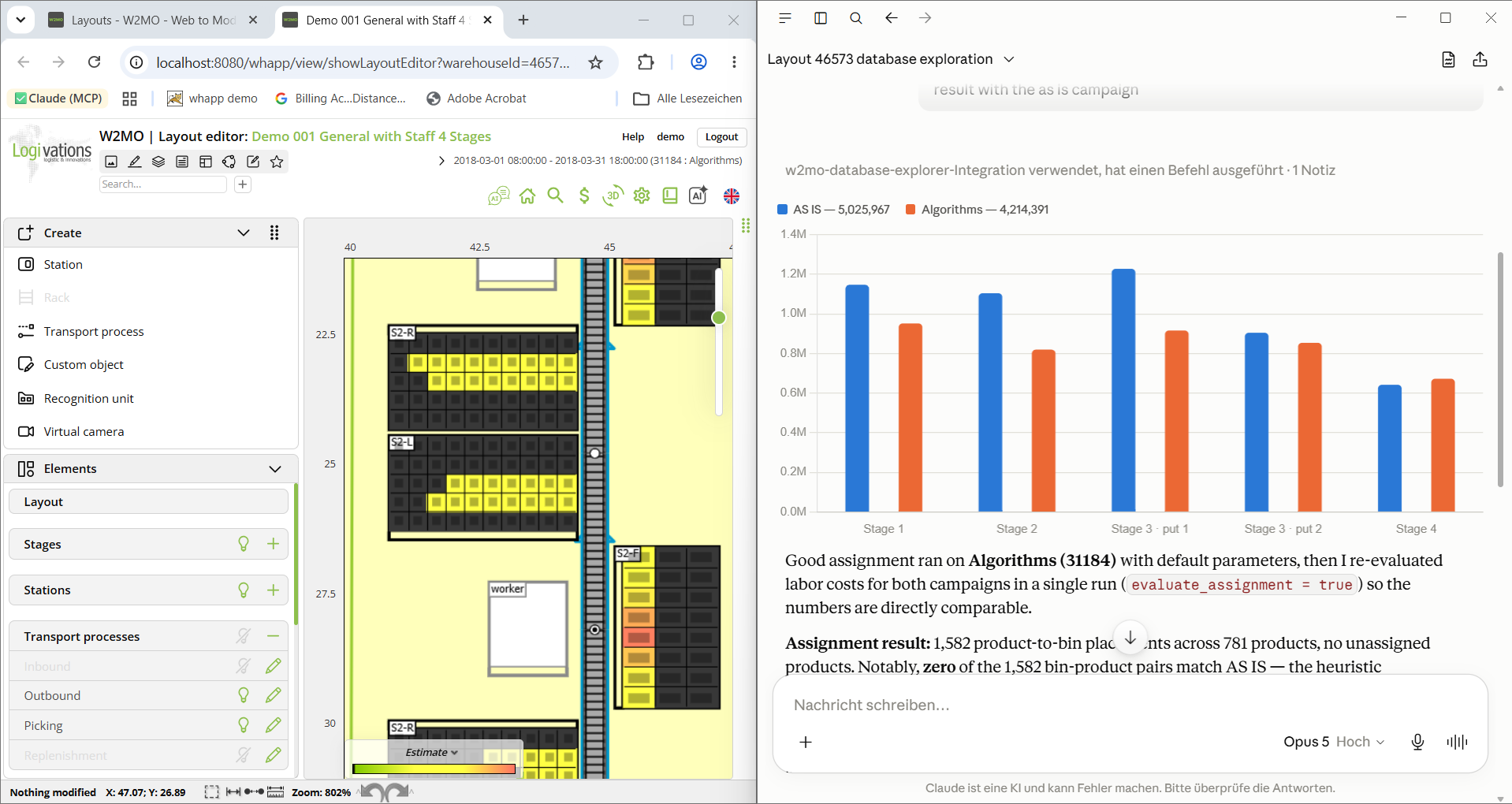
Performing an analysis in ninety minutes instead of ten hours and finding issues we did not even look for in the first place. This is just one example of how GenAI changes our project work.
A manufacturer in a regulated industry asked us to review the storage capacity of their distribution center. A standard task for our consultants: import inventory and movement data, analyze utilization by storage type and identify capacity bottlenecks.
Usually this takes around two to eight hours for the data import and mapping, plus roughly eight hours for the analysis of the stock itself and the preparation of some first result slides.
Run with an AI agent connected to the digital twin, the import took half an hour and the analysis one hour. By this time the first version of the presentation was ready. Ten hours became ninety minutes.
However, the saved time was not the only benefit. The agent flagged a group of successor articles: replaced SKUs still holding stock alongside their replacements, occupying storage locations that the capacity calculation had counted as legitimately used. That finding was available in the data all along. In a manual analysis with a fixed time budget, it would very likely have gone unnoticed.
The simulation engine is rarely the bottleneck
In simulation projects in logistics, building the model itself is only a small part of the work. Before the first meaningful scenario can be evaluated, the project team has to understand the available data, map import fields and flag data inconsistencies. After the run, the same team examines large result sets to compare scenarios. At the end, the team prepares the findings as a basis for decision making.
Modern simulation software handles large datasets and calculates detailed scenarios efficiently. Projects still take weeks or months, because the delays sit between the technical steps rather than inside them.
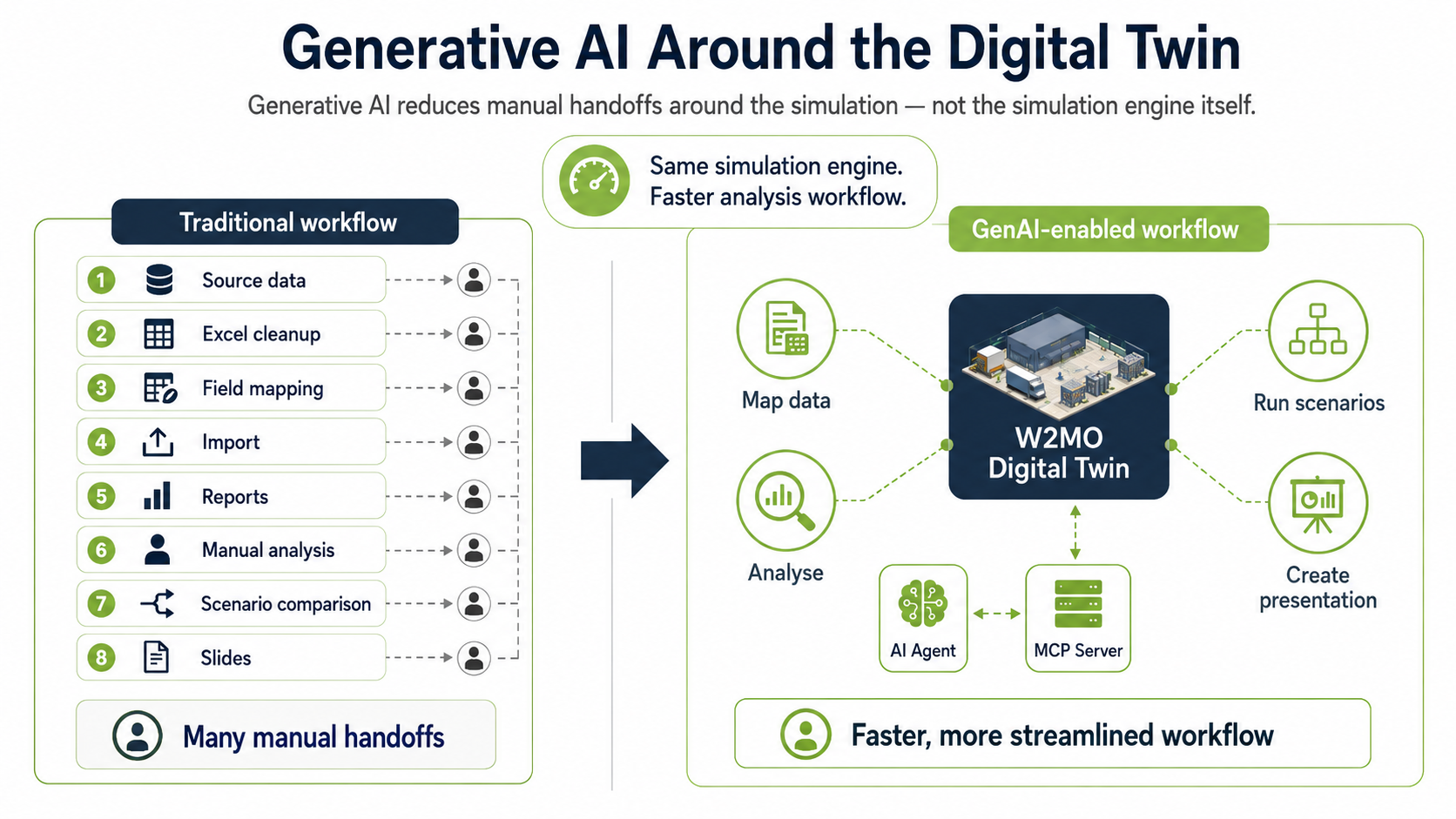
With GenAI, analysts can ask the project question directly instead of first finding the right report, filters and tables. A user can ask:
Which product groups are responsible for the highest picking workload during the peak hour? Also check which storage areas are most loaded during that time?
The language model determines which data is needed, queries it from the digital twin and returns the result.
The simulation itself does not change. It still uses the same proven algorithms W2MO is known for. A simulation or a slotting algorithm does not become faster because a language model sits next to it. The actual results still come from the simulation and optimization algorithms in W2MO. The language model mainly handles the interaction with these tools and the subsequent analysis.
Connecting W2MO and language models through an MCP server
W2MO combines logistics data, warehouse layouts, processes, simulation models and optimization algorithms in a single digital twin platform.
Through the W2MO Model Context Protocol (MCP) server, this environment can be connected to language models such as Claude, ChatGPT or Gemini. Companies can also connect an approved enterprise model or one they host themselves. MCP is an open standard, so the setup does not become dependent on a single AI provider. Capability differences between providers shift every few months, and the model should be replaceable without touching the twin.
The MCP server acts as a controlled interface. It defines which data the model may access and which actions it may perform. Access can be restricted by user, project and use case. All relevant queries and actions can be logged.
For W2MO this is already in productive use. In our projects, we currently see the largest effect in three areas.
1. Asking instead of navigating
A digital twin holds millions of datapoints, and W2MO produces a lot of standard evaluations from them. In a typical project we open maybe a fifth of them. Looking at the rest would just cost too much time. So the consultant asks the LLM instead of clicking through reports and filter settings.
The model works out which data it needs and answers based on the data from the digital twin. To make the answer checkable, the query used to get the data is part of the answer too, and the consultant can double-check it in the W2MO report.
2. The handovers at both ends of the project
At the beginning and at the end of a simulation project, the work mostly consists of moving information by hand between systems.
At the beginning we often get from our customers a folder of exports: ERP, warehouse management system, and in most projects at least one spreadsheet that somebody has maintained manually for years. Field names, units and date formats differ between the files. The usual fix is to restructure the sheet manually.
The second handover point is the presentation at the end. Charts get exported, numbers get typed into PowerPoint, and someone writes explanations for people who never saw the model. Short-term changes to a scenario create the need to adjust all slides.
Using the MCP server, the consultant can now describe what the fields mean for the import:
The field MaterialNo contains the SKU. DeliveryQty is the number of pieces. Use PlannedShipDate as the demand date. Convert dimensions from millimeters to meters and map the customer number to the existing customer master. Rows without a valid storage location go into a separate list for review.
This results in a proposed mapping and a list of data inconsistencies to be checked with the customer. The consultant checks it and approves it. The import then runs through the MCP server into W2MO with all the existing validation in place, so nothing enters the twin that would not have passed before.
For the preparation of the presentation at the end, the model can use all the information it already has. KPIs and diagrams can be directly created based on the data in the digital twin. This draft still needs work for sure and the argumentation we write ourselves anyway. But nobody needs to retype a figure.
3. When the budget stops deciding what gets looked at
So far this is the same work done faster. The next part is work that did not happen before at all.
Every project has a list of analyses that would be worth doing and get dropped during planning due to budget reasons: comparing article master data against actual movements, checking whether order structure explains the workload peaks, looking for outliers in process times, redoing the ABC/XYZ segmentation for several periods instead of one. None of them is difficult. Each costs an hour or two and might turn up nothing.
An agent runs them anyway.
That is where the successor articles from the example came from. Articles that had been replaced were still sitting in stock next to their replacements, on locations that the capacity calculation had counted as properly used. It was in the data from the beginning. However, nobody would have looked for it manually.
Checks like this improve the input data and with that every result the simulation produces afterwards. In the last projects we came across this kind of error already in the first week instead of being pointed to it in the results workshop.
The scenario side looks similar. A warehouse project might examine different layouts, storage strategies, shift models, automation, volume growth. Done by hand, each variant means changing parameters, running the calculations and comparing results at the end. Instead of that, now the consultant describes the range:
Create scenarios for 10, 20 and 30 percent volume growth. For each scenario, calculate the required workforce and equipment, identify the first bottleneck and compare the results with the current layout.
The agent copies the approved baseline, changes the demand parameters, starts the defined algorithms and verifies that each run completed. Then it pulls the KPIs, compares them, looks into the deviations that stand out and writes up a consolidated assessment.
A single scenario does not compute any faster. What goes away is the handling around it, and that is why a project can examine twelve variants instead of three.
This leads to a completely different type of project. With three scenarios, the selection is itself one of the bigger decisions, and it gets made early, before anybody knows much. With twelve you are not really choosing anymore. Of everything described here, that has been the most useful change for us.
Where human expertise remains essential
Generative AI does not turn an incomplete model into a valid simulation. Experienced consultants are still needed to define the objective, assess data quality, choose an appropriate level of detail and validate the model against the real operation.
In our projects, two limitations have proven particularly important. First, the underlying twin has to be calibrated correctly before an agent adds value — generative AI on top of a badly calibrated model just produces well-worded wrong answers. Second, validation still has to be done by a person: when an agent reports a 14 percent reduction in travel distance, that's a claim, not a proof, and the plausibility check against real operations is the one step that shouldn't be compressed.
For us, this means that an AI-generated result must remain traceable in W2MO: which dataset was queried, which simulation was started, which scenario parameters were changed and which result was used for the recommendation. Changes to models or scenarios should require appropriate permissions and, where relevant, human approval. The interaction logs also cover part of the project documentation, which saves the consultants additional time.
Where the time saving actually comes from
The ninety minutes in the example above are one analysis, not one project. Extrapolating a single figure to a full project would be misleading, because the savings are concentrated in activities that are repetitive, structured and currently done by hand. The ranges below reflect what we have observed in our own projects. They are not a guaranteed outcome, and they depend heavily on the state of the source data.
| Project phase | Observed effect of GenAI support |
|---|---|
| Data import and mapping | 50–75 percent less effort, provided the source data is reasonably complete |
| Data validation and consistency checks | Comparable effort, substantially more checks performed; a quality effect rather than a saving |
| AS-IS analysis and reporting | 60–85 percent less effort |
| Model building, layout, process logic | 10–25 percent; the agent assists, the modeling decisions remain |
| Simulation and optimization runtime | Unchanged; this is algorithmics, not language |
| Scenario creation and comparison | 50–70 percent less effort per scenario, and more scenarios become affordable |
| Documentation and presentation | 50–80 percent less effort |
| Workshops, validation, decisions, change management | Unchanged |
The actual benefit depends on the quality of the available data, the complexity of the model and how far the workflow can be standardized. Before anyone quotes a percentage, it is worth agreeing on the baseline it refers to.
From operating software to discussing logistics decisions
For analysts and logistics decision-makers, this changes how they work with simulation. Instead of navigating a sequence of reports and configuration dialogs, the work starts with the logistics question:
What happens if volume grows by 20 percent? Why does the optimized scenario need more staff in goods receipt?
The calculations still come from the digital twin and its simulation and optimization algorithms. Generative AI provides a new way to interact with them and can automate many of the analytical steps around the calculation. This leaves simulation experts with more time for the parts of the project where their experience adds the most value.
If you want to evaluate this for your own operation, don't start with a demo dataset. Take one real logistics question and one real dataset, and compare how long it takes to get a reliable answer with your current workflow and with the agent. If you want to try that with W2MO, let us know.